
Created by a 35-year classroom teacher.
The right words to say.A portfolio of learning.
You tap, speak or photograph what you see and hear from a student. Teacher Supreme keeps it in that student’s dated, FERPA-safe record, gives you research-based words to say in the moment, and drafts the messages and reports that parents, counselors and IEP teams need.
AI that works for the teacher, not instead of the teacher. AI reads your memos and your students’ work. The words come from research, and names are replaced on your phone before anything reaches the AI.
No card needed to start · FERPA-safe by design
Two ways to log student interactions
By voice. Tap Listen once. Say the student’s name twice within ten seconds, then describe what the student is saying and doing. Your eyes stay on the student and the class, not on a screen.
By tap. Tap the academic or behavior indicator on the student’s card. It’s quick and easy, and it works when you can’t talk out loud, like during a test.
Try the demo: log a student interaction and write the parent email. No sign-up.
This is Marcus Cook’s card, a sample student. Marcus just explained how the bases of DNA pair. Tap Academics.
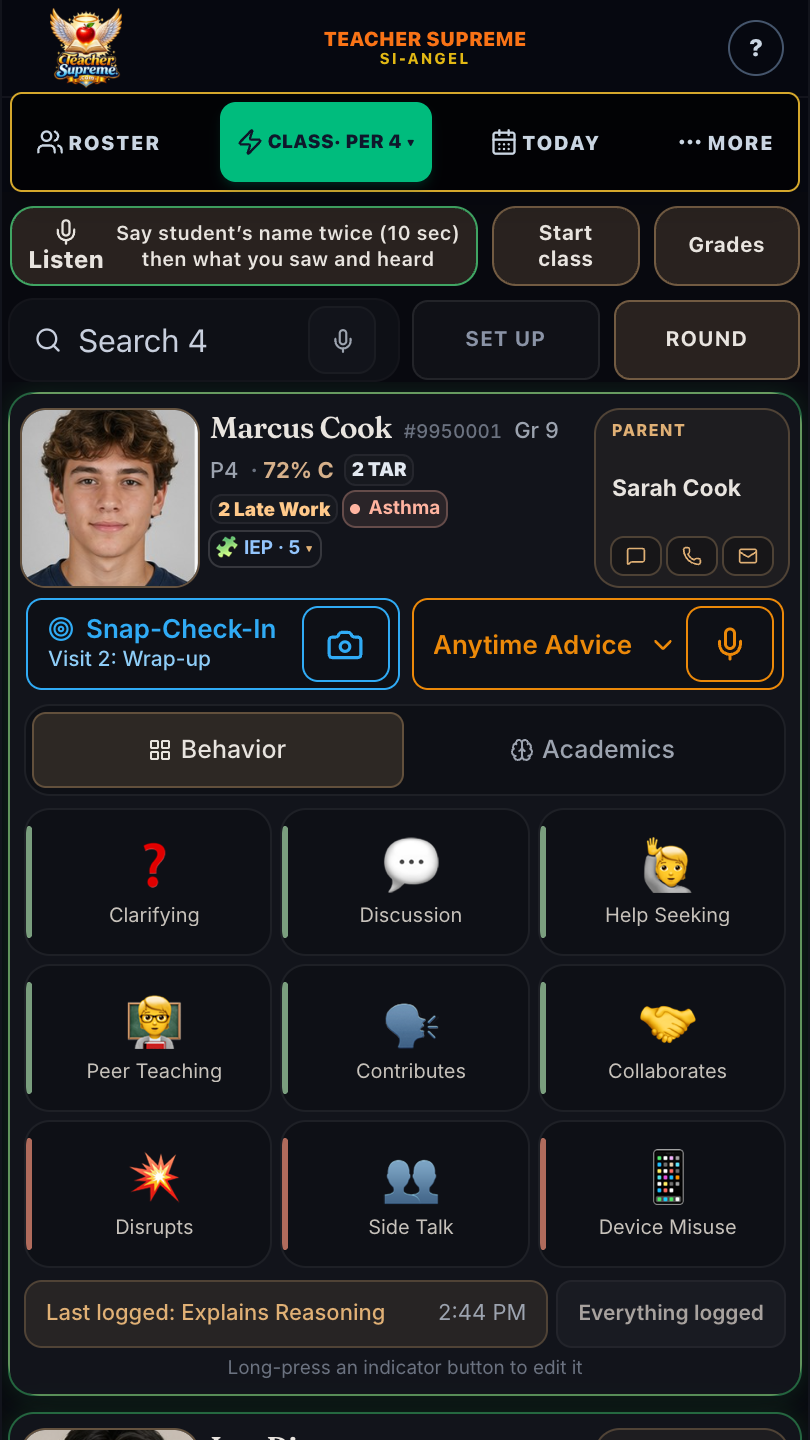
Step 1 of 6 · Sample student. Nothing here is saved or sent.
The whole story in one video
Jeff’s student card, the 25 indicators, the words to say in three levels, a Snap-Check-In, and the Progress Report home.
Anytime Advice
How is this student doing?
When a parent, counselor or principal asks, tap Anytime Advice on the student’s card. It is that student’s progress report, built from everything you recorded, newest first: the words to say next, how the student is doing this week against last week, and the dated evidence, with the whole grading period one tap away. The grade, attendance, late work and support plans are at the top of the same card.
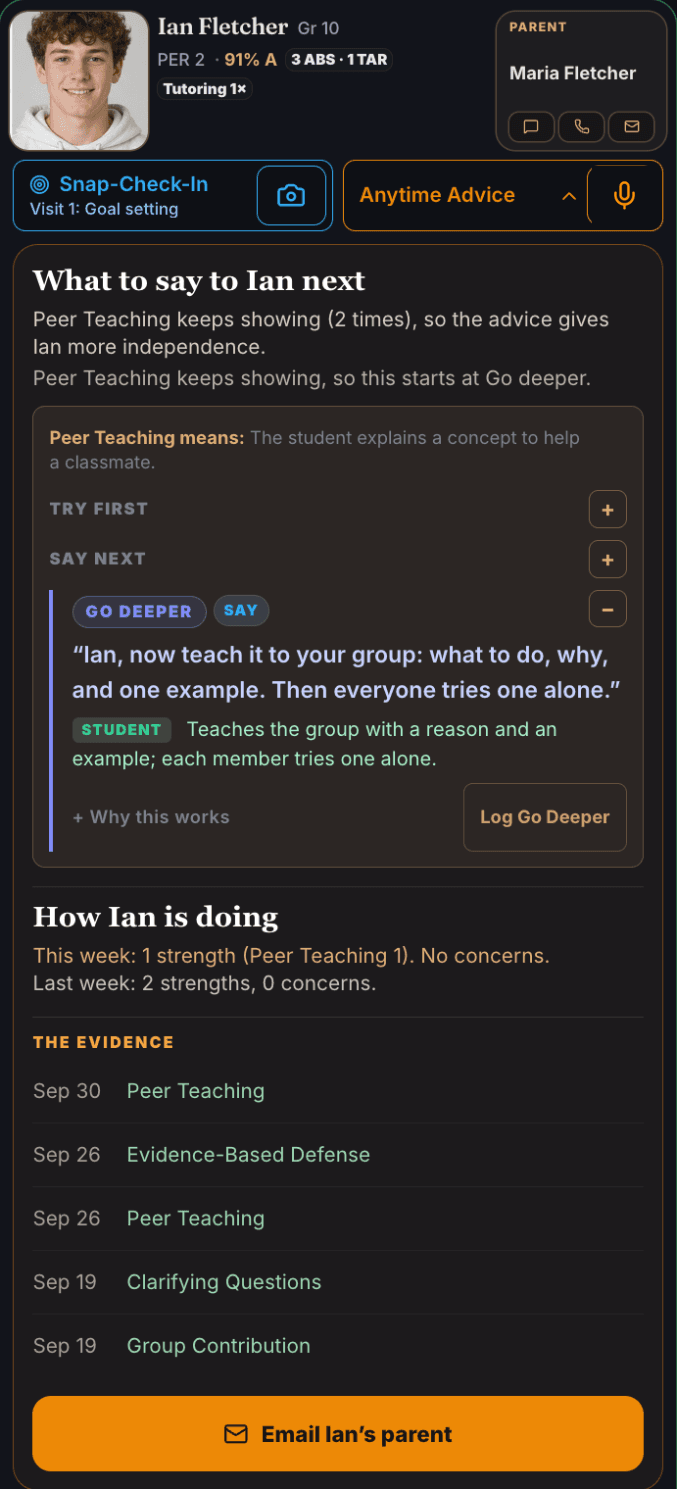
The coaching here comes from the pattern, not from one moment. Ian has shown Peer Teaching again and again, so the advice starts at Go deeper and hands Ian more independence. A concern that keeps coming back moves to the next step instead of repeating the first one.
One tap on Email Ian’s parent writes the email from that evidence, and one more tap inside it turns it into a note for the counselor, for you to read, change and send. The same record helps with grading, citizenship grades, parent conferences and IEP meetings.
Like a pilot’s heads-up display, Teacher Supreme puts what you need to know about each student in front of you while you teach.
Snap-Check-In or Anytime Advice?
Snap-Check-In is for right now, at the student’s desk. One photo of the student’s work gives the score, each missed question with the right answer, and the coaching for that piece of work.
Anytime Advice is for any time someone asks how the student is doing. Everything you recorded, newest first, gives the progress report, the dated evidence, the coaching for the pattern, and the email home.
Both use the same research-backed Try first, Say next and Go deeper words. What changes is what the words are based on: one piece of work, or the student’s whole record.
In the moment
The right words, right now
For the behaviors and academic work that need a response. Leo is talking with a classmate during work time. Tap Side Talk: it is saved to Leo’s record, and three levels of research-backed words open.
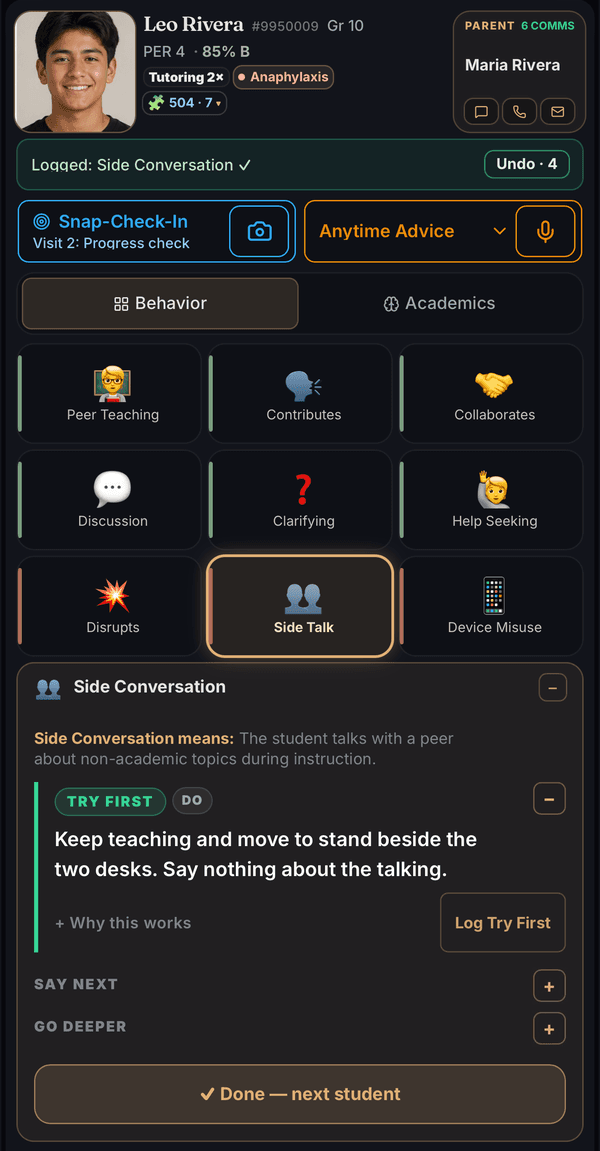
- Try first: the first move, right now. For Leo it is something to do, not say, so no one is called out in front of the class.
- Say next: the words if it continues, and what the student should do, so you can see whether it worked.
- Go deeper: the step after that, so the student keeps learning and working on their own.
A student talks back, shuts down, or stops trying — and you need the right words to say in the moment. Speak the way you normally do in class, and say the student’s name twice within ten seconds: “Emma, I see you have your laptop open. Emma, I saw you collaborating with your classmate.” Teacher Supreme lifts Emma’s card to the top of your class list, and what you said is already the observation. Teacher Supreme matches your words to one of the 25 research-backed indicators and shows you three levels of coaching: Try first, Say next, Go deeper.
Say “Log Try First”. Approve what stays in that student’s portfolio of learning; it is time-stamped, in your words. One tap turns it into a parent text, a phone script or an email, ready for you to send, and the whole record exports for a 504 or IEP meeting. So parents, counselors and your principal see a record instead of a recollection.
Twenty-five research-backed indicators, each with three levels of words to say next: Try first, Say next and Go deeper, written for your students’ age. They open from whatever you just did:
- Tap what you see. The words for that indicator appear at once. No AI is used.
- Speak or type a memo. AI matches it to the closest indicator, after every name becomes a code on your phone.
- Snap a student’s work. A Snap-Check-In finds what the student is missing and brings the words for it.
- Tap Anytime Advice on a card. See the last week, two weeks or grading period for that student, and the advice for the pattern that stands out.
Anytime Advice is part of the paid plan, and included in every 28-day free trial.
The evidence
How We Verify the Research Behind Teacher Supreme
We trace every one of the 25 behaviors back to the original study and rate the teaching practice behind it on the U.S. Department of Education’s four evidence levels: Strong, Moderate, Promising and Research rationale. We give the most weight to randomized controlled trials, the research standard for showing cause and effect. Before a rating is published, a separate review checks it against the original study for errors.
- 13 behaviors that move learning forward. Eleven are supported by studies that found a statistically significant positive link to learning, including a randomized trial in 47 school districts.
- 12 behaviors that hinder learning. Each is defined and measured in published research.
The hard days
For the hardest interactions
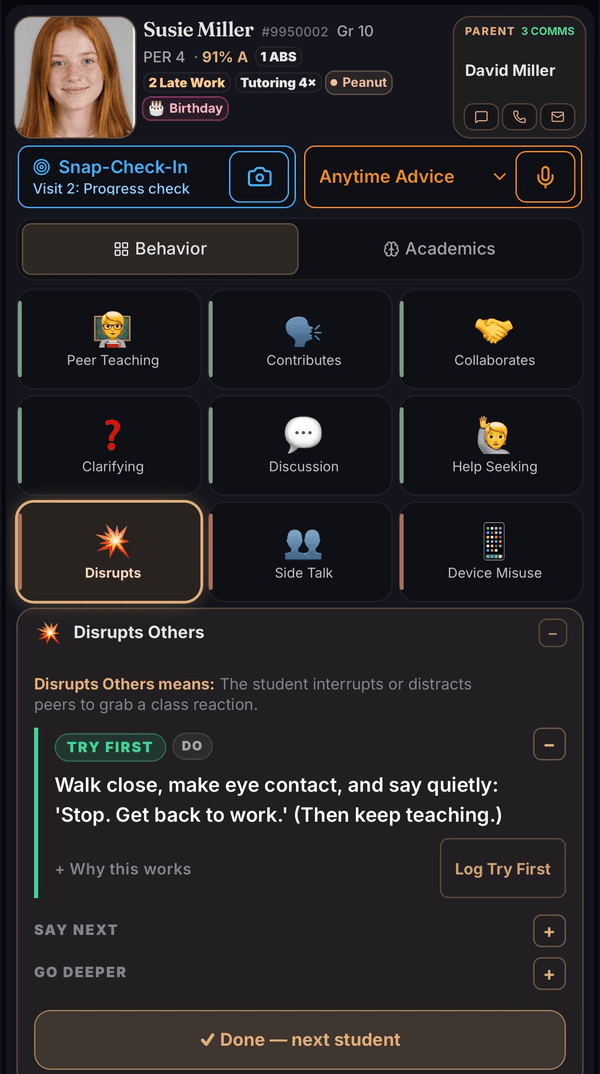
“I don’t know.” “I don’t care.” “Forget it.” A laptop pushed away. An argument in front of the whole class. These are the interactions that wear a teacher down. Teacher Supreme names what you saw, such as Task Avoidance, Says I Don’t Know, Defiance / Back Talk or Disrupts Others, and gives you the words to say next. You answer the behavior, not the hurt.
The research agrees. Across 21 groups of teachers, student misbehavior was linked to all three signs of burnout, and most strongly to emotional exhaustion.
Aloe, Shisler, Norris, Nickerson & Rinker (2014), Educational Research Review 12, 30–44
Snap-Check-In
One class period
Check in with each student and set a learning goal. Check in again with the research-backed words for what that student needs next.
Connect with a student or team. Tap Snap-Check-In on a student’s card. The first words to say are at the top: “Hi Trent, what’s your learning goal today?”
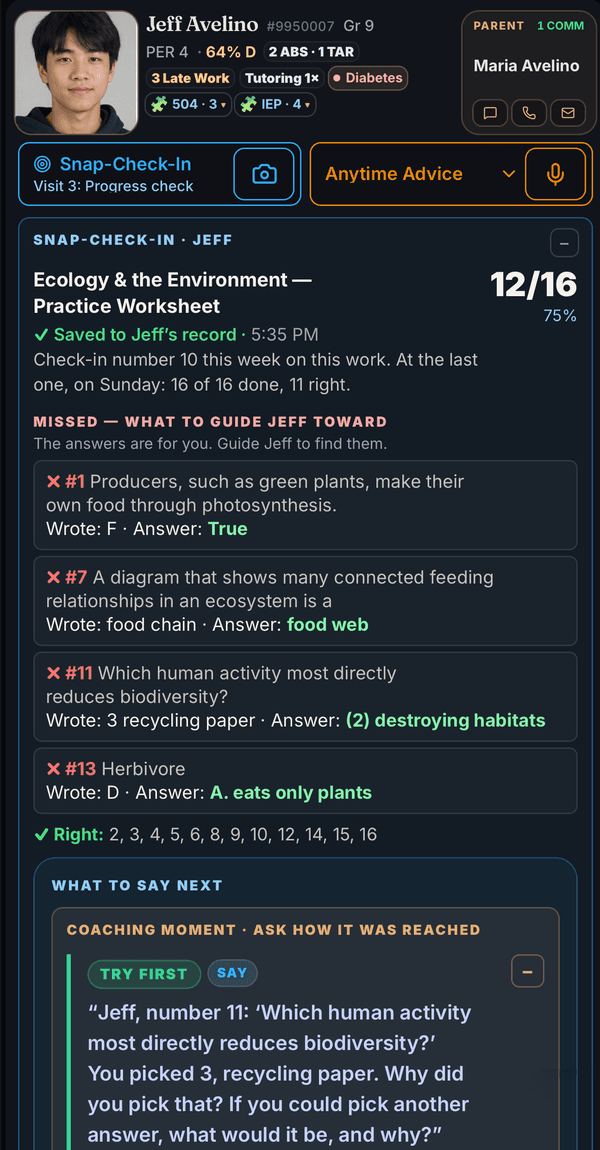
Snap their work, on paper or on the student’s screen. Teacher Supreme reads the answers, shows how many are right with the right answer for each one missed, and names any answer you should check yourself.
Say the right words. Try first, Say next, Go deeper: three levels of research-backed words for the work you just photographed. The goal is a student who knows what they did right and can do it again without you.
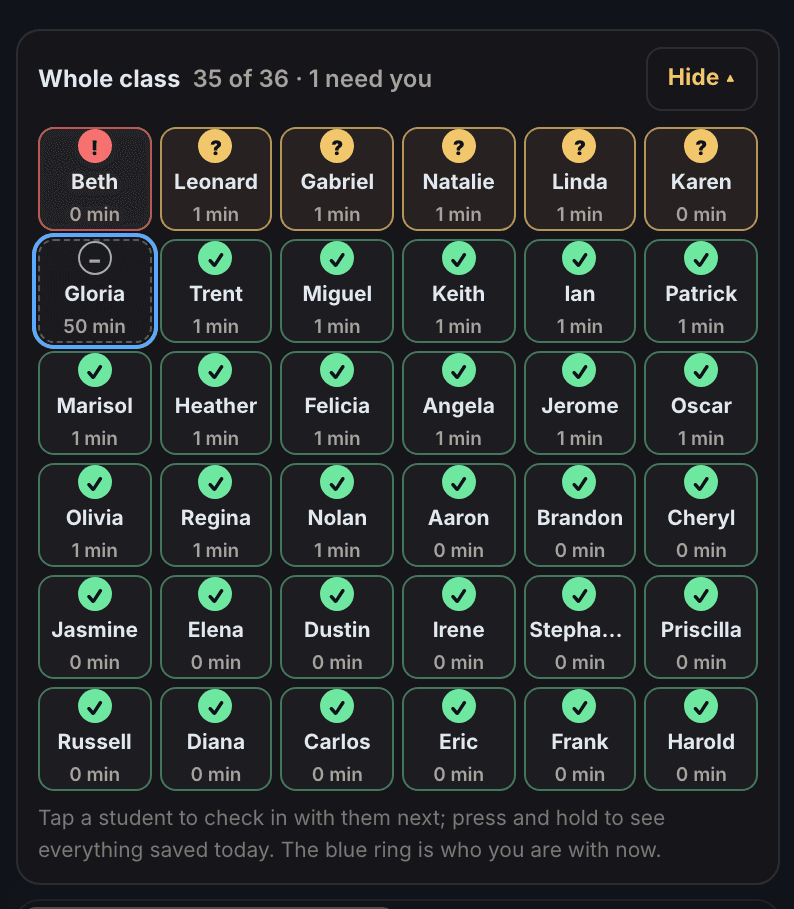
See the whole class. Under the check-in, every student in the class: needs you, check in, not seen yet, working, ready for more, each with the minutes since you last checked in. Tap a student and that student’s check-in opens; press and hold to see everything saved for that student today.
Reteach while it still matters. When most of the class misses the same question, or two or more students share the same mix-up, Teacher Supreme names it during the period, while you can still reteach it. When the mix-up is a known misconception, the full Snap-Check-In shows the words to reteach it.
Keep parents in the loop. A text, a phone script or an email, written from what you saved and opening with today’s check-in. You read it, change it, and send it yourself.
Saves you time: each check is scored during class, not in a stack you take home.
Protects you: everything you save is dated, a record for parent conferences, IEP meetings and your principal instead of a recollection.
Builds relationships: you meet with each student about their own work, with words that name what they did and the next step.
Snap-Check-Ins are part of the paid plan, and included in every 28-day free trial.

Scan with your phone camera
Why the words matter
Good job isn’t teaching.
More than 1 in 3 times, feedback made performance worse.
In 607 research results, feedback about the person instead of the work was the kind that backfired (Kluger & DeNisi, 1996). Teacher Supreme gives you words about the work itself: which question, what the student picked, and what to try next.
Your student explains how they got the answer — every step, out loud. The thing you have been waiting all year to hear.
You say “good job.” And you feel the pressure to keep moving, because the rest of your students are waiting.
That was the moment to name what that student did. It happens hundreds of times a week, and it happened to me — not from not knowing, but because nobody retrieves the exact research finding while the pressure to keep moving is already on you.
James Morris, M.Ed. · taught 35 years in public K-12 education · founder
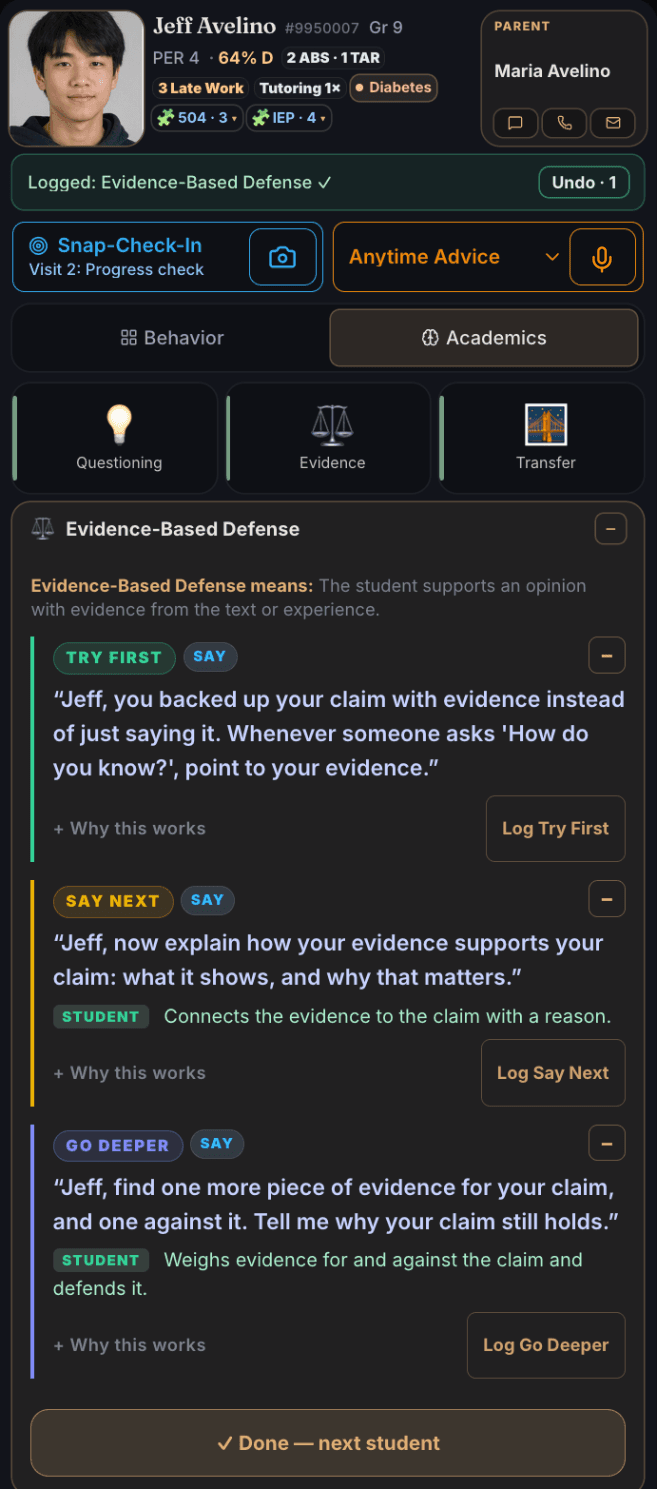
Jeff goes back into the reading to find evidence for his answer. Tap Evidence, and instead of “good job” you have the words that name what Jeff did.
The research is specific about what a general compliment costs. In six studies with 412 fifth graders in all, Mueller and Dweck (1998) gave children the same score, then praised one group for being smart (“you must be smart at these problems”), a second for working hard (“you must have worked hard at these problems”), and gave a third no praise. The only difference was what the praise credited. In the first study, 67% of the students praised for being smart then chose a task that would let them look good over one they would learn more from — and after a setback they were less willing to keep working and finished below where they had started. The students praised for their effort kept going and finished higher. A 2019 repeat of the study with children in China (Li & Bates) did not find the same effects on motivation, so the finding is not settled.
“Good job” just doesn’t cut it. Praise a child for being smart, and the next mistake can feel like proof that they are not smart. In the 1998 study above, children praised that way were more likely to blame a failure on not having the ability. Name the thinking steps — “You went back to the reading and found evidence” — and they chase the thinking. Each time a teacher names the thinking, the student hears exactly which steps to use again on their own. That is teaching a student to fish.
Mueller & Dweck (1998) — the study, and the sentences it produced →
Built on peer-reviewed classroom research. Every coaching phrase in Teacher Supreme puts into plain words a teaching practice from published classroom research, including research reviews that pool hundreds of studies on feedback and on teacher–student relationships. The research behind Teacher Supreme →
4 weeks free · no card to start
Co-teaching & special education
For co-teachers and special education
When a special education teacher or another co-teacher joins a class, Teacher Supreme gets them ready before they walk in and keeps the record of every support.
The lesson’s big picture
The classroom teacher adds the lesson slides as a PDF. Teacher Supreme writes a one-page briefing: the big idea, the learning target, the lesson flow, where students usually get confused, and the key words. Each line says whether it came from the slides or is a Teacher Supreme suggestion. The teacher shares it with a private link that ends after 30 days.

The answers, exactly as the teacher wrote them
Add the answer key as a PDF, and the co-teacher sees the teacher’s own answers word for word. No AI writes or changes them.
Questions answered from the lesson
The co-teacher asks a question, typed or spoken into the phone’s keyboard, and the answer comes from the teacher’s slides and answer key, and says so when they do not cover it.
Every IEP and 504 support, counted
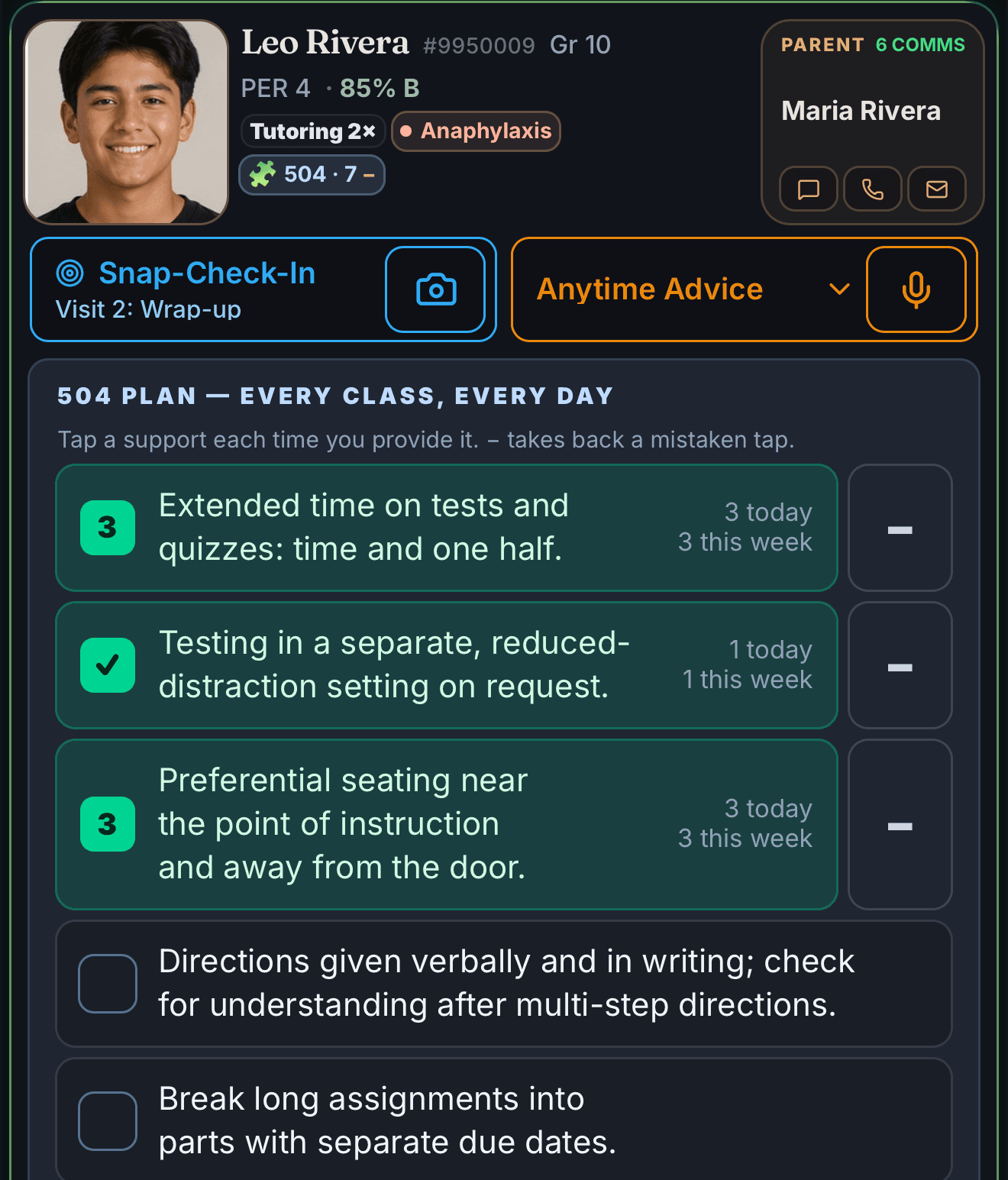
Open a student’s IEP or 504 list and tap a support each time you provide it: extended time, a movement break, a copy of the notes. Or say it in a memo, “I gave Leo extra time on the quiz,” and tap Log as provided. The list shows how many times today and this week, and copies a dated log for the IEP or 504 meeting.
Planned together
Who does what, notes between the two teachers, and a three-question check-in after the lesson.
Student names are replaced with codes before a lesson is read, and the shared page never shows student names or student records.
Reports home
A report for every family
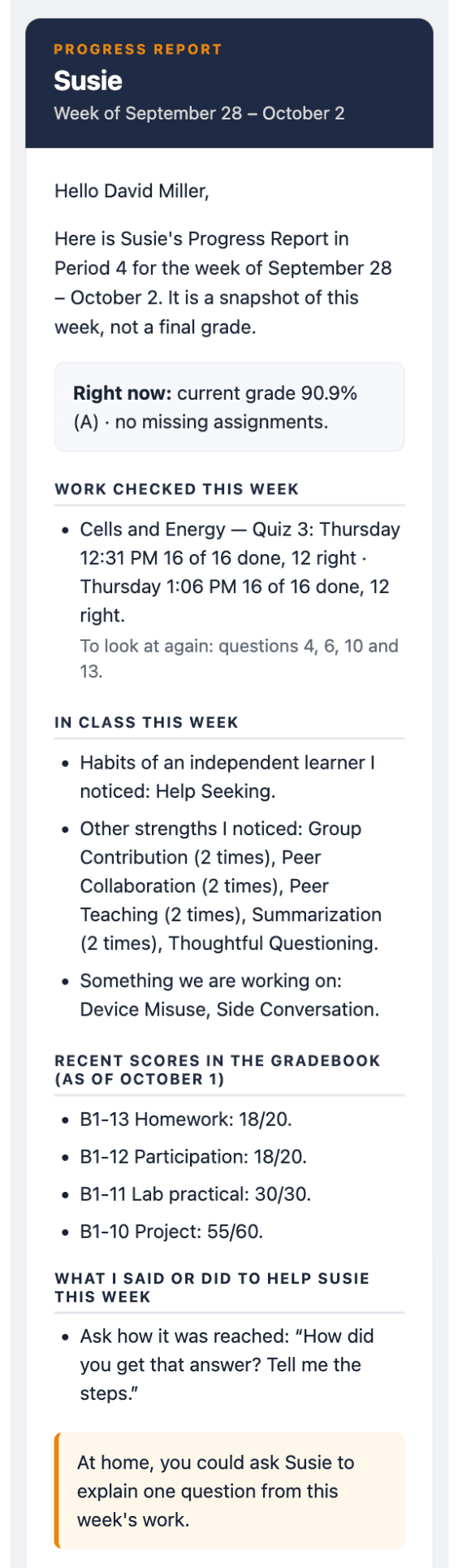
Each week Teacher Supreme puts together a Progress Report for each family from what you recorded: the current grade and missing assignments, the work you checked and the questions to look at again, the strengths you saw, what the student is working on, recent gradebook scores, what you said to help, and one question to talk about at home. You read it, change anything you want, and send it.
The record behind it
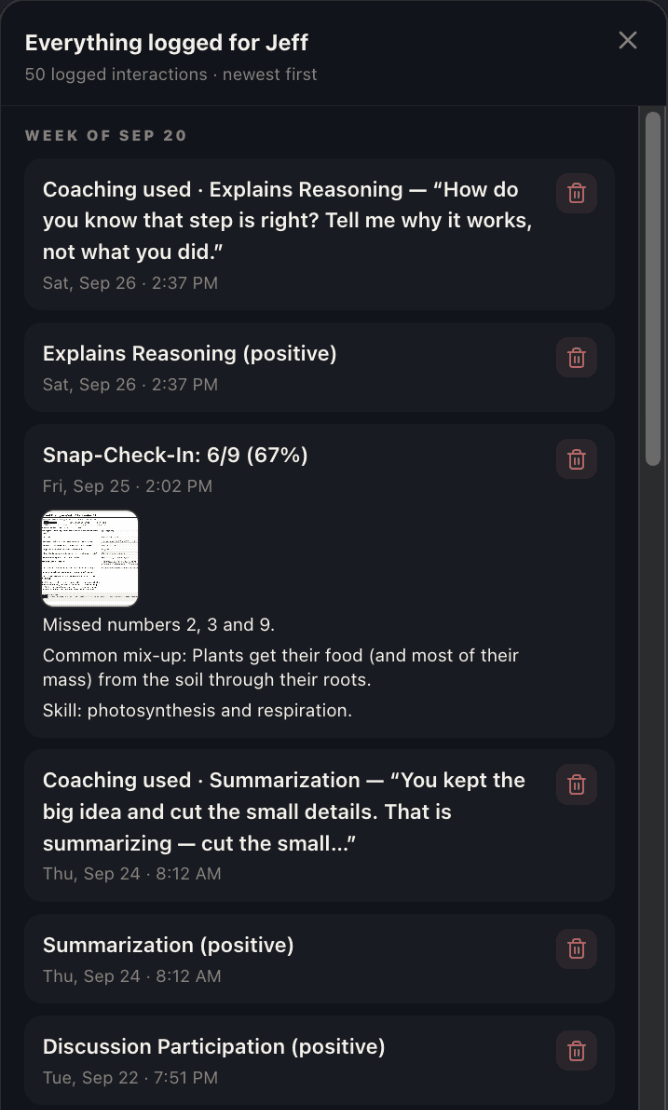
Tap Everything logged on a card for the student’s whole record, newest first, each interaction with its date and time. Use it for grading, parent conferences, 504 and IEP meetings, or to share with a counselor or an administrator: a record instead of a recollection.
The student card
A card for every student
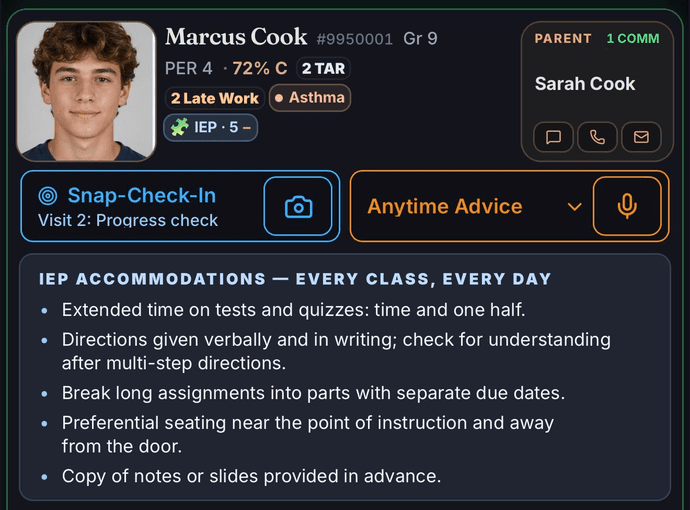
On your phone or tablet, each card shows the student’s photo, grade in your class, attendance, late work, tutoring visits, health alerts and support plans, with the parent’s text, call and email one tap away. Tap IEP on Marcus’s card and his accommodations are in front of you while you teach.
Setting up a class takes two photos: your class roster on your computer screen, which makes a card for every student, and your seating chart, which puts each student’s face on their card.
FERPA-safe by design
AI that works for you
Teacher Supreme uses AI to read your memos and your students’ work and to organize everything you record. The words to say come from the research library, and you decide what is said and what is sent. Every student’s private information is protected before it leaves your phone.
- 01
On your phone
Every name on your class list, typed or said, is replaced with a code or a made-up name before it reaches any AI company. On a photo of a worksheet, IEP page, attendance sheet or gradebook, names are blacked out or replaced with codes on your phone first. If your phone cannot hide a name with confidence, nothing is sent until you decide. A roster photo is read on your phone, and only coded text is sent.
- 02
What the AI reads
Codes, never names. Your phone puts the real names back when the answer returns. Our AI provider’s paid terms prohibit training on any of it.
- 03
In the cloud
Your backup holds each student only as a code. Names, parent contacts and photos of student work sit inside a locked copy that only your own signed-in devices can open. Encrypted at rest (AES-256) and in transit, with every teacher’s data sealed off from every other.
A student’s name leaves your devices only when you choose: a report you send to a parent, or a photo you decide to send as it is.
See exactly how it works →Ten privacy questions, answered plainly →
The research library
25 indicators
Research-backed behaviors and academic signs, each with three levels of words to say. Twenty-five of these, each one something a teacher can actually see a student do.
Cognitive Investment
7 of 25Signs a student is genuinely thinking, not just complying.
Explains ReasoningSummarizationSustained FocusThoughtful QuestioningEvidence-Based DefenseTransfer StrategiesGoal-setting
Active Participation
6 of 25Engagement you can see and hear, not just paper turned in.
Peer TeachingGroup ContributionPeer CollaborationClarifying QuestionsDiscussion ParticipationHelp Seeking
Cognitive Withdrawal
6 of 25The quiet ways a student checks out of the thinking, even while staying in their seat.
Task AvoidanceLow/No EffortRushed WorkSays I Don’t KnowIntellectual GuessingDelayed Response
Off-Task Behavior
6 of 25The behaviors most teachers already catch — now with the exact word for what’s happening.
Disrupts OthersSide ConversationDevice MisuseCopying WorkWandering / DaydreamingDefiance / Back Talk
See all 25, exactly as Teacher Supreme listens for them ↓Close the list ↑
Cognitive Investment
- Explains Reasoning
- Summarization
- Sustained Focus
- Thoughtful Questioning
- Evidence-Based Defense
- Transfer Strategies
- Goal-setting
Active Participation
- Peer Teaching
- Group Contribution
- Peer Collaboration
- Clarifying Questions
- Discussion Participation
- Help Seeking
Cognitive Withdrawal
- Task Avoidance
- Low/No Effort
- Rushed Work
- Says I Don’t Know
- Intellectual Guessing
- Delayed Response
Off-Task Behavior
- Disrupts Others
- Side Conversation
- Device Misuse
- Copying Work
- Wandering / Daydreaming
- Defiance / Back Talk
Every one of them traces to a named, peer-reviewed source: the research that defines and measures the behavior — the observation system school psychologists code with, validated teacher rating scales, published measurement studies. One tap opens the full list.
You can also describe what you saw in your own words. Say “Jeff backed up the claim with numbers from the reading,” and Teacher Supreme names it Evidence-Based Defense and shows you the words to say to Jeff before the bell. That is in-the-moment mentoring: professional development in context, instead of in a meeting months later.
4 weeks free · no card to start
One plan
Priced by the class
One plan. Everything Teacher Supreme does, for every class you teach.
Teacher Supreme is $10 a month per class. Each class holds up to 50 students, and you pay only for the classes you teach.
$10 a month per class
The card and everything on it: tap and voice logging, same-day parent email, daily summary, student PDFs, CSV export, trend charts, and an alert when a student’s pattern shifts before you would have caught it yourself. The words: the In-the-Moment Mentor and Anytime Advice show you the research-backed words to say on that student’s card while you are still with the student. The paperwork: Snap-Check-In with reteach and extension, weekly Progress Reports written from your logs, Photo Input for your gradebook, IEP/504 accommodations and the attendance screen, substitute mode, conference packets, lesson ideas from your own logs, and “who needs attention?” on demand.
| Classes | Price$10 per class |
|---|---|
| 1 · 50 students | $10 |
| 2 · 100 students | $20 |
| 3 · 150 students | $30 |
| 4 · 200 students | $40 |
| 5 · 250 students | $50 |
| 6 · 300 students | $60 |
Up to 50 students in each class. Beyond 6 classes, each class is another $10 a month. Start with 4 free weeks, no card to start. Pay 10 months up front, get the full 12. Cancel anytime.
Compare every feature, side by side →
Created by a teacher
James Morris, M.Ed.
Taught 35 years in public K-12 education
After 35 years in the classroom, James Morris designed and created Teacher Supreme so every teacher has a card for every student, the research-backed words to say in the moment, and a dated record that becomes a Progress Report. Tap or speak to log academics and behavior. Use Snap-Check-Ins to photograph a student’s progress. Open Anytime Advice to see how a student is doing and the words to say next.
When Sophia backs up an answer with evidence, Teacher Supreme saves it to Sophia’s record and shows you the words that help Sophia keep learning that way.
Read James’s article in Creative Educator: Say What You See: turning everyday student interactions into progress.
Questions teachers ask
Answers before you start.
Every answer written from what Teacher Supreme actually does. Tap one to open it.
Is there a free trial, and do I need a card to start?
Yes — 28 free days, every feature unlocked, and no card is needed to start. The clock begins when you add your first real class roster, not when you sign up; signing up alone starts nothing.
Will I get charged automatically after the trial without warning?
No, and it is not possible. We do not collect a credit card to start, and we do not collect one during the trial unless you choose to subscribe early — so there is no card on file to charge when day 28 arrives. The 28 free days are deliberate: use it with your own students and decide for yourself whether it is worth $10 a month for each class. If it is, subscribe any time — early, or when the trial ends. If it is not, do nothing: the paid features simply stop, nothing is billed, and your own record is still yours to export.
How much does Teacher Supreme cost?
Teacher Supreme is $10 a month per class. There is one plan. Each class covers up to 50 students, and you only pay for the classes you actually teach — there is no separate account fee on top. Three classes is $30 a month; six classes is $60.
Where does my students' data actually live — on my phone or in the cloud?
Almost everything lives on your own phone: full names, photos, parent contact info, ID numbers, IEP/504 and medical notes, and your written notes, all encrypted by your device's own operating system. The cloud backup holds each student only as a code like STU-3F9A1C — no first name, no last name, no initial — plus timestamps and the notes you save, with every name in them changed to the code on your phone first. Names, ID numbers, parent contacts and photos of student work reach it only as a locked copy that only your own devices can open. The device is where the real record lives; the cloud is a thin, coded backup.
What can the AI see about my students, and what can't it see?
For anything typed or spoken, every name on your class list is replaced with a code or a made-up name before it reaches the AI company, and Teacher Supreme turns the codes back into names when the reply comes back. Add the names students go by, like nicknames, to their cards, and Teacher Supreme codes those too. For a photo you deliberately ask it to read, like an attendance sheet, the name is the data being read, so your phone codes or blacks out the names in the pixels first — for every photo flow except a first roster import, which has no roster yet to check names against.
Can my principal read my log?
No. Your interaction log is private, and that is enforced in the database itself — every read and write reduces to a single check of whether the record belongs to your own account, so there is no key that unlocks another account's records for management to view. If your school licenses the district product, admins see aggregate trends across classrooms, never your individual entries.
How long does setting up my class take?
Most of setup is optional and skippable — only adding a roster is asked for up front (by photo, spreadsheet, or typing), and the bell-schedule step can be added later from the More tab. A single-photo roster import is the fastest path: review the names it found and tap Save.
Can I export all my data, and what's actually in the export?
Yes — under More → Archive, one tap downloads a single backup file with everything stored on your device: your full roster (names, photos, parent contacts), every logged interaction, behavior and attendance records, paper-trail notes, and seating charts. On the paid plan, More → Export also gives one-tap CSV downloads of your roster and your logged interactions, built entirely on your own phone.
All 53 questions, answered plainly →
How to get started — short videos of Teacher Supreme itself →
The right words to say.A portfolio of learning.
Start your 28-day free trial — no card required to start.
Already a member? Sign in